

Online Learning Benefits for Students | Online Education

Young woman as a university student wearing a wireless headphone while studying online class at home. Online learning benefits for students studying on laptop

The online learning benefits are transforming the way students gain knowledge and develop new skills. With the growth of digital technology and internet access, more students are choosing digital education instead of traditional classroom learning. These advantages offer flexibility and convenience, making learning more accessible to modern students.

Online Learning Benefits: Flexibility and Convenience

One of the biggest benefits of online education is flexibility. Students can study from anywhere and often choose their own schedule. This makes online learning for students ideal for those who are working part-time or managing other responsibilities. Unlike traditional classrooms, online courses allow students to learn at their own pace and review lessons whenever necessary. This flexibility helps students manage their time better and stay organized with their studies.

Access to More Courses and Educational Opportunities

Another major advantage of online classes is the wide variety of courses available. Students are no longer limited to programs offered by local schools or universities. Instead, they can enroll in courses from institutions around the world. Platforms such as Coursera provide access to thousands of courses in different subjects, allowing students to explore new topics and improve their professional skills.

Cost-Effective Online Learning Options

Online learning can also be more affordable compared to traditional education. Students can save money on transportation, accommodation, and textbooks. Many online programs offer digital learning materials that reduce overall costs while still providing quality education. According to organizations such as UNESCO, digital learning helps make education more accessible to students worldwide.

Conclusion: Why Students Prefer Online Education

In conclusion, the online learning benefits make it an excellent option for modern students. From flexibility and accessibility to cost savings, online learning for students continues to transform education and provide new learning opportunities across the globe.

Benefits make it an excellent option for modern students. From flexibility and accessibility to cost savings, online learning for students continues to transform education and provide new learning opportunities across the globe.https://aahmad97.dragonteach.com/wp-admin/post.php?post=40&action=edit

Benefits of online education for students

How to Customize Your WordPress Website: A Step-by-Step Guide

In this tutorial, I’ll walk you through how to change your WordPress theme, use HTML tags in posts, apply Custom CSS, insert code blocks, add images with alt text, and install Google Analytics. These are essential skills for managing a professional WordPress website. 😊

1. How to Change Your WordPress Theme

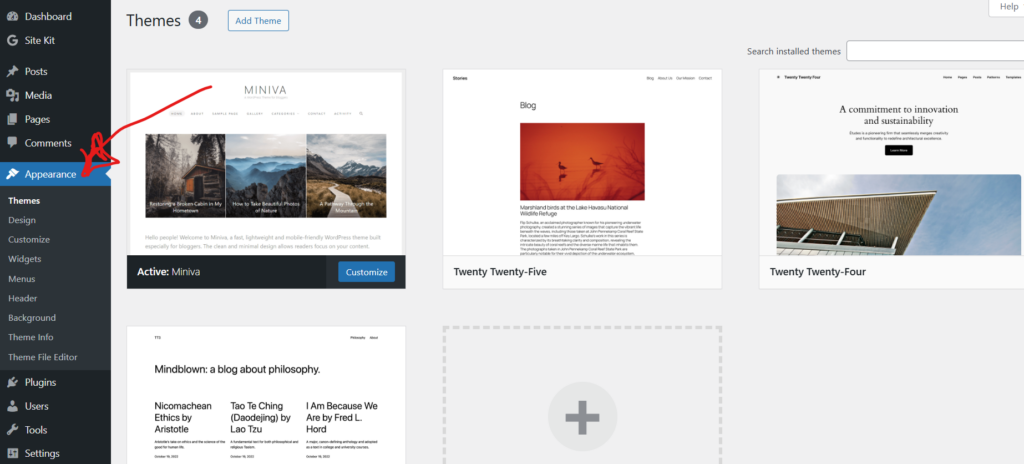
Refer to the image below for guidance as needed.

  1. Log in to your WordPress Dashboard.
  2. Go to Appearance β†’ Themes.
  3. Click Add New to browse available themes.
  4. Hover over a theme and click Preview to see how it looks.
  5. Click Activate to apply it to your site.

If you’re using a restricted WordPress.com plan, some custom themes are not available unless you upgrade. Otherwise self-hosted WordPress installations allow full theme customization.

2. Using HTML Tags in a Blog Post

In the WordPress Block Editor, you can add a Custom HTML Block to manually write HTML. Below is an example of basic HTML structure:

<h1>This is a Heading 1</h1>
<h2>This is a Heading 2</h2>
<p>This is a paragraph with <em>emphasized text</em>.</p>
<ul>
<li>Unordered List Item 1</li>
<li>Unordered List Item 2</li>
</ul>
<ol>
<li>Ordered List Item 1</li>
<li>Ordered List Item 2</li>
</ol>

Explanation of the Code:

<h1>: Used for the main heading of the page.
<h2>: Used for subheadings.
<p>: Used for paragraphs.
<em>: Used to emphasize text (italicized).
<ul>: Used for unordered (bulleted) lists.
<ol>: Used for ordered (numbered) lists.

What This Code Does:

  • <h1> and <h2> create headings.
  • <em> emphasizes text in italics.
  • <strong> makes text bold.
  • <ul> creates an unordered list.

You can also create an ordered list using <ol> instead of <ul>.

3. Using Custom CSS

To add Custom CSS:

  1. Go to Appearance β†’ Customize β†’ Additional CSS
  2. Add your CSS code
  3. Click Publish

Example of Custom CSS:

body {
background-color: #f4f4f4;
}

h1 {
color: darkblue;
text-align: center;
}

or you can use inline CSS in an HTML block:

<p style="color:red; font-weight:bold;">This text is styled with inline CSS.</p>

Custom CSS allows you to control colors, spacing, fonts, and layout.

4. Adding an Image with Alt Text

To insert an image:

  1. Click the + (Add Block) button.
  2. Select Image.
  3. Upload or choose from Media Library.
  4. Add Alt Text in the right sidebar.

Example image: Wordpress Dashboard Image

Alt Text Example: “WordPress dashboard image.”

Using Alt text improves accessibility and SEO.

5. Installing Google Analytics in WordPress

To track visitors, install Google Analytics.

Step 1: Create a Google Analytics Account

Visit the Google Analytics website and create a property for your website. Copy your Tracking ID (ex. G-XXXXXXXXXX).

Step 2: Install a Plugin

  1. Go to Plugins β†’ Add New.
  2. Search for β€œGoogle Analytics.”
  3. Install a plugin such as Site Kit by Google.
  4. Click Activate.

Step 3: Connect Your Account

  1. Follow the setup wizard.
  2. Sign in with your Google account.
  3. Verify your website.
  4. Confirm Analytics connection.

If plugin installation is disabled (some WordPress.com plans), you will need to upgrade or manually insert the tracking code in the theme header (Appearance β†’ Theme File Editor β†’ header.php).

Finally πŸ™‚

By learning how to change themes, write HTML, apply CSS, insert code blocks, add images with alt text, and integrate Google Analytics, you can gain full control over your WordPress website. These skills help you design, customize, and analyze your site effectively. Cheers!!

Two reasons puppies are so very cute.

Nunc sollicitudin tincidunt mauris sit amet volutpat. Etiam et imperdiet lacus, quis semper nibh. Proin non iaculis mi, a congue enim. Nam blandit nisl non ante aliquet malesuada. Nulla eget sapien ornare, accumsan tortor ut, rhoncus leo. Duis elementum metus non est congue, ac placerat mi laoreet.

Continue reading “Two reasons puppies are so very cute.”

What makes Golden Retrievers the coolest cottage dogs?

Duis et risus in tortor laoreet iaculis sed sed tellus. Mauris congue mi pretium ipsum scelerisque, non interdum nunc elementum. Donec aliquet risus elit, at posuere augue pellentesque eu. Ut vestibulum eget mi eget ullamcorper. In molestie iaculis congue.

Continue reading “What makes Golden Retrievers the coolest cottage dogs?”